
Moderator Menu
Introduction
1. The moderator configures the application settings and manages the learning process.
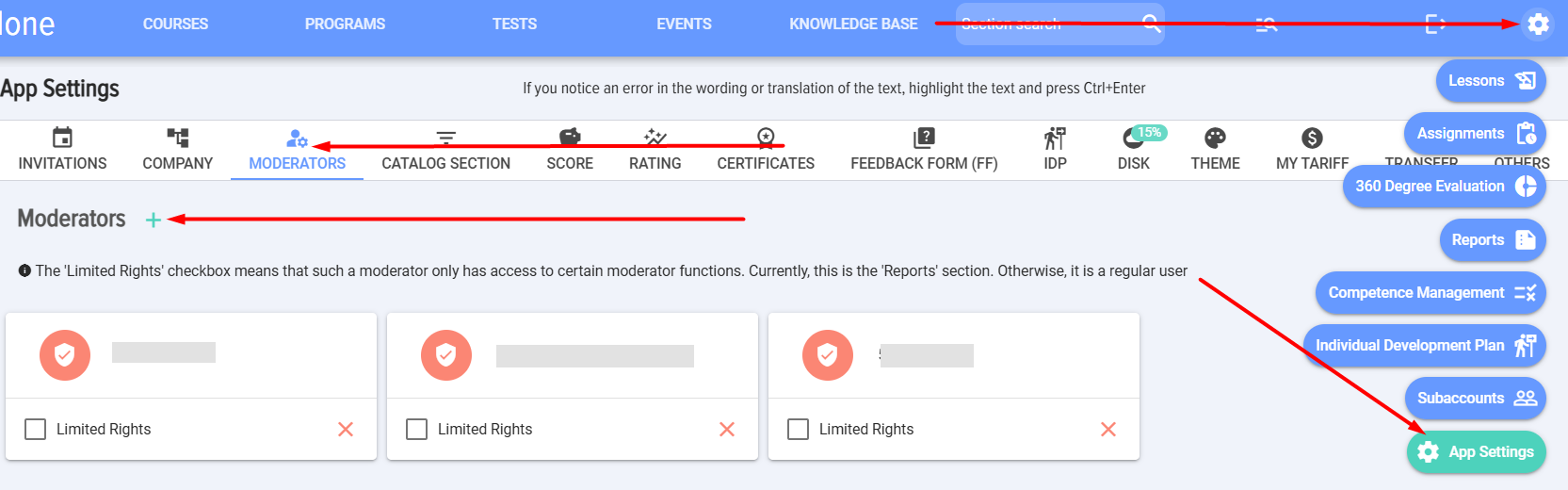
2. The first moderator is added automatically and is the person who installed the application. The second and subsequent moderators can be added by another moderator or by the CRM system administrator.
3. To add a moderator:
- Click on the gear icon in the upper right corner (it is available to the CRM or ERP system administrator, not available to regular employees).
- Select Application Settings.
- Moderators Tab.
- Click the plus and select an employee.
4. Moderator with limited rights. Limited Rights means that such a moderator has access to only some moderator functions. Currently, this is Section 'Reports'. Otherwise, this is a regular user.
Filling the moderator menu
1. The Moderator menu consists of two blocks:
- For managing the learning process:
- Lessons.
- Assignments.
- 360 Assessment.
- Groups.
- Reports.
- Competence management.
- Individual development plan.
- Subaccounts.
- For application settings.
1. The Moderator configures the application settings and manages the learning process.
2. The first moderator is added automatically; it is the person who installed the application. The second and subsequent moderators can be added by another moderator or the CRM system administrator.
3. To add a moderator:
4. Moderator with Limited Rights. Limited Rights means that such a moderator has access to only some moderator functions. Currently, this is the 'Reports' Section. Otherwise, it is a regular user.
Moderator Menu Content
1. The moderator menu consists of two blocks:
- For managing the learning process:
- Lessons.
- Purposes.
- Assessment 360.
- Groups.
- Reports.
- Competency Management.
- Individual Development Plan.
- Sub-accounts.
- For application settings.