
Individual Development Plan
1. This section presents the employee's individual development plans, as well as those where they have been selected as a supervisor/mentor.
2. If the application settings specify that an employee can create IDP themselves, then the button to create IDP will be available:

3. The Individual Development Plan includes the following key sections:
- Control elements;
- Employees;
- Additional materials in the form of files;
- Competency Title. Competencies, in turn, include:
- Indicators of manifestation;
- Current and Target Level manifestation indicators;
- Measures aimed at developing manifestation indicators.
4. Controls include:
- Export;
- Removal;
- Publish/Unpublish

5. Section with files looks as follows:

6. Next, follow Section with competencies and their indicators:
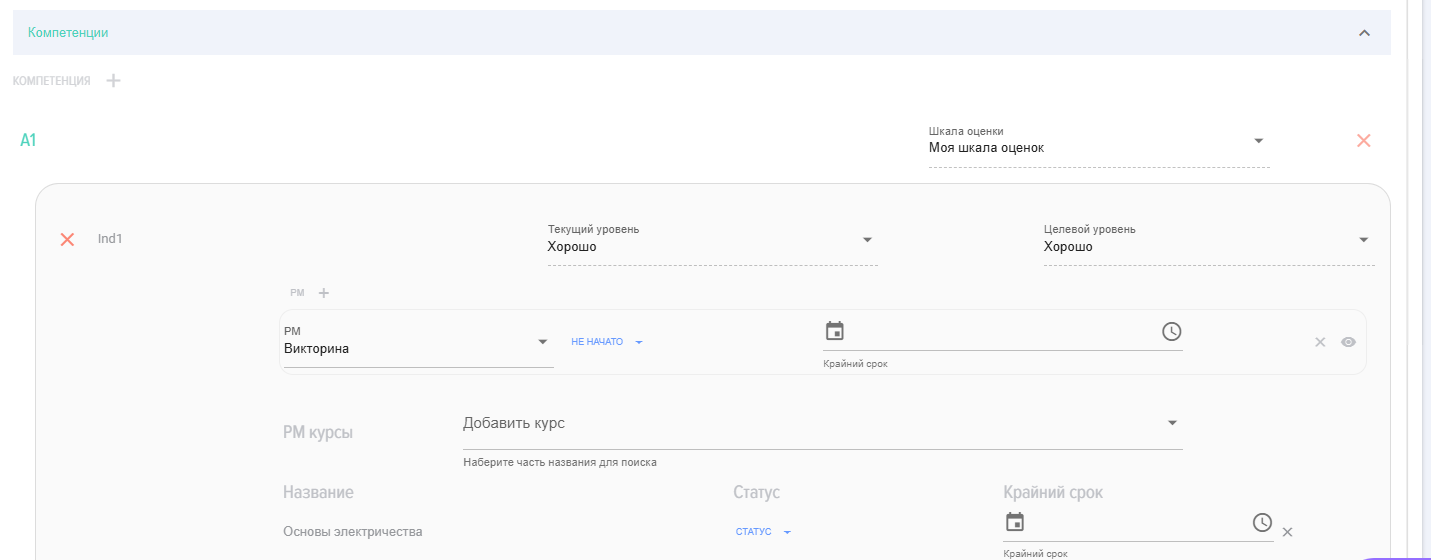
7. The logic of operation and presentation is as follows:
- Competence (e.g., Competence 1);
- It is reflected in indicators (e.g., indicator 1.1, indicator 1.2);
- The scale used to assess the current development level of each indicator and Target Level;
- In order to progress to the target level of the indicator's development, developmental activities must be carried out;
- Next, the implementation of developmental activities takes place, and the Mentor and/or supervisor monitor the Status of their execution.
As a developmental activity, you can select Event from the proposed list or add Course from the course catalog.
To add a course from the catalog, start typing its name and the application will suggest options.
Introduction
1. Individual Development Plans (IDP) are built based on the competency model.
Individual Development Plan (IDP) is a set of training and development activities (DA) that contribute to competencycompetence improvement and professional growth.
2. The model IDP is formed as follows:
Competence 1;
- Indicator 1.1 - Scale, Target Level
- Developmental Event 1.1 for Indicator 1.1
- Developmental Event 1.2 for Indicator 1.1
- Indicator 1.2 - Scale, Target Level
- Developmental Event 1.1 for Indicator 1.2
- Developmental Event 1.2 for Indicator 1.2
- Developmental Event 1.3 for Indicator 1.2
A competencecompetency can have any number of indicators, and indicators can have any number of developmental activities.
3. Each employee has their own individual IDP.
4. The roles in the module are as follows:
- Employee - the employee for whom the IDP is being generated. Can enter Status for developmental activities.
- Manager - the
supervisoremployee'sof the employee.supervisor. Creates IDP, monitors its execution. - Mentor - Mentor of the employee. Creates IDP, monitors its execution.
- Application
Moderatormoderator - can perform any actions.
Implementation Scenario
A) In the "Settings - Application Settings - IDP" section, the parameters for creating IDP are set - who can create it.
BIn the "Settings - Individual Development Plan" section, a IDP is created for a specific employee. Also,Additionally, IDP can be created by employees themselves from their personal account, if this option is allowed:enabled:
- A
nametitle is entered. IDP is created, then the created IDP is expanded and all other data is filled in:- Selected: the employee for whom the IDP is being created, the immediate supervisor, and the Mentor (if necessary);
- Files are added (if necessary);
- Text comments are added (if necessary);
CompetenciesThe competencies to be developed are selected;- Each indicator (or only competency) is supplemented with developmental activities.
At the same timetime,
- Competencies are selected from the approved ones;
- Each Competence has its own set of manifestation indicators;
- Developmental activities (DA) are formed for each indicator;
- As a developmental activity, you can choose an available
oneoption from the list or add Course from the catalog.
InAfter the creation of IDP, it is sent for approval and authorization. Once approved, it is published and becomes available to the employee in their personal account.
HNext, the employee proceeds with the implementation of IDP and records the statuses offor developmental activities. Mentor and the manager see these changes in their personal accounts.
Statuses IDP
- Published.
- Not published.
Statuses of IDP
Frequently Asked Questions
Question: How to add Course, developing Event, to an individual development plan?
Answer:
Currently, developmental activities can only be added to manifestation indicators. Select Manifestation Indicator, developmental activity, or Course and specify the deadline.
Question: What is Individual Development Plan (IDP)?
Answer:
Individual Development Plan (IDP) is a set of training and development activities aimed at enhancing an employee'semployee competencies and professional growth. It is based on a competency model and is unique for each employee.
Question: On what basis is the model IDP formed?
Answer:
The IDP model IDP is formed based on competencies. Each Competence consists of indicators, for each of which a scale and Target Level are established. One or several developmental activities maycan be linked to each indicator.
Question: What roles exist in the module IDP and what are their responsibilities?
Answer:
The following roles are provided in the moduleIDP IDP:module:
- EmployeeThe one for whom the IDP is
formed.generated. They can record statuses for developmental activities. - ManagerCreates
aIDP for the employee and monitors its execution. - MentorIt can also create IDP and track its execution.
- Application
moderatorModeratorHas full access and can perform any actions in the module.
Question: How is IDP created?
Answer:
The creationCreation of IDP begins in the section "Settings - Application Settings - IDP", section, where the creation parameters are set. Then, in the section "Settings - Individual Development Plan", asection, IDP is created for a specific employee. TheIn the In Progress of completion involves selectingform, the employee, manager, Mentor (if necessary), addingare selected, files and comments,comments asare welladded, as selectingand competencies for development.development are chosen. For each indicator (or competency), developmental activities are added, which can be chosenselected from a list or added as courses from the catalog.
Question: What is the approval and publication process for IDP?
Answer:
After creation, the IDP is sent for coordinationapproval and approval.endorsement. AfterOnce approval,approved, it is published and becomes available to the employee in their personal account. Only after publication can the employee proceed with the implementation of the plan.
Question: How does an employee interact with IDP after its publication?
Answer:
After the publication of IDP, the employee proceeds with its implementation. They record the statuses of development activities in their personal account. The managersupervisor and Mentor see these changes, which allows them to track the progress of the plan's execution.
Question: What statuses can IDP have?
Answer:
IDP can have two main statuses:
- PublishedIDP
ishas been approved and is availabletofor the employeefortoexecution.perform. - Not publishedIDP is in
the process ofIn Progress of creation or approval and is not yet available to the employee.
Question: How to add Course or developmental Event to an individual development plan?
Answer:
Currently, developmental activities, including courses, can only be added to competency manifestation indicators. ItYou is necessary tomust select a specific Manifestation Indicator, then add the corresponding developmental Event or Course and specify the deadline for its completion.
How to add a course or a development event to an Individual Development Plan (IDP)?
Answer:
Currently, development events can only be added to manifestation indicators. Select a manifestation indicator, development event, or course and specify the deadline.
Question: What is an Individual Development Plan (IDP)?
Answer:
Individual Development Plan (IDP) is a set of learning and development events aimed at enhancing competencies and professional growth of an employee. It is based on the competence model and is unique for each employee.
Question: On what basis is the IDP model formed?
Answer:
The IDP model is formed based on competencies. Each competence consists of indicators, for each of which a rating scale and a target level are set. One or more development events can be linked to each indicator.
<h3>Roles in the IDP Module and Their Responsibilities</h3> <ul> <li><strong>Employee</strong>: Creates and updates their own IDP, selects <strong>Development Events (DE)</strong>, and tracks progress.</li> <li><strong>Mentor</strong>: Provides guidance, approves selected <strong>DEs</strong>, and monitors the employee's development.</li> <li><strong>Approver</strong>: Finalizes and approves the overall <strong>IDP</strong>.</li> <li><strong>Observer</strong>: Has view-only access to the <strong>IDP</strong> progress without editing rights.</li> </ul>
Answer:
In the IDP module, the following roles are provided:
Question: How is an IDP created?
Answer:
The creation of an IDP begins in the section "Settings - Application Settings - IDP," where the creation parameters are set. Then, in the section "Settings - Individual Development Plan," an IDP is created for a specific employee. During the completion process, the employee, manager, and mentor (if necessary) are selected; files and comments are added; and competencies for development are chosen. For each indicator (or competence), development events are added, which can be selected from a list or added as courses from the catalog.
Question: What is the process for approving and publishing an IDP?
Answer:
After the IDP is created, it is sent for coordination and approval. After approval, it is published and becomes available to the employee in their Personal Account. Only after publication can the employee proceed with the plan implementation.
Question: How does an employee interact with the IDP after its publication?
Answer:
After publishing the IDP, the employee proceeds to its implementation. They record the statuses for Development Events (DE) in their Personal Account. The Manager and Mentor see these changes, which allows them to track the progress of the plan's completion.
Question: What statuses can an IDP have?
Answer:
An IDP can have two main statuses:
Question: How to add a Course or Development Event (DE) to an Individual Development Plan (IDP)?
Answer:
Currently, development events, including courses, can only be added to manifestation indicators of a competence. It is necessary to select a specific manifestation indicator, then add the corresponding development event or course and specify the deadline for its completion.