AOC
InThe theapplication application,allows you canto create feedback forms for tests, courses, events, programs, and knowledge base materials.
By Default The application already has a feedback form and it is used for all 4 types of events.
You can create an unlimited number of forms. However, at any given time, only one form per type (courses, tests, events, programs) can be active.
ToЧтобы addдобавить aновую newанкету form,нажмите clickна on theэлемент "AddДобавить Form" element.анкету".
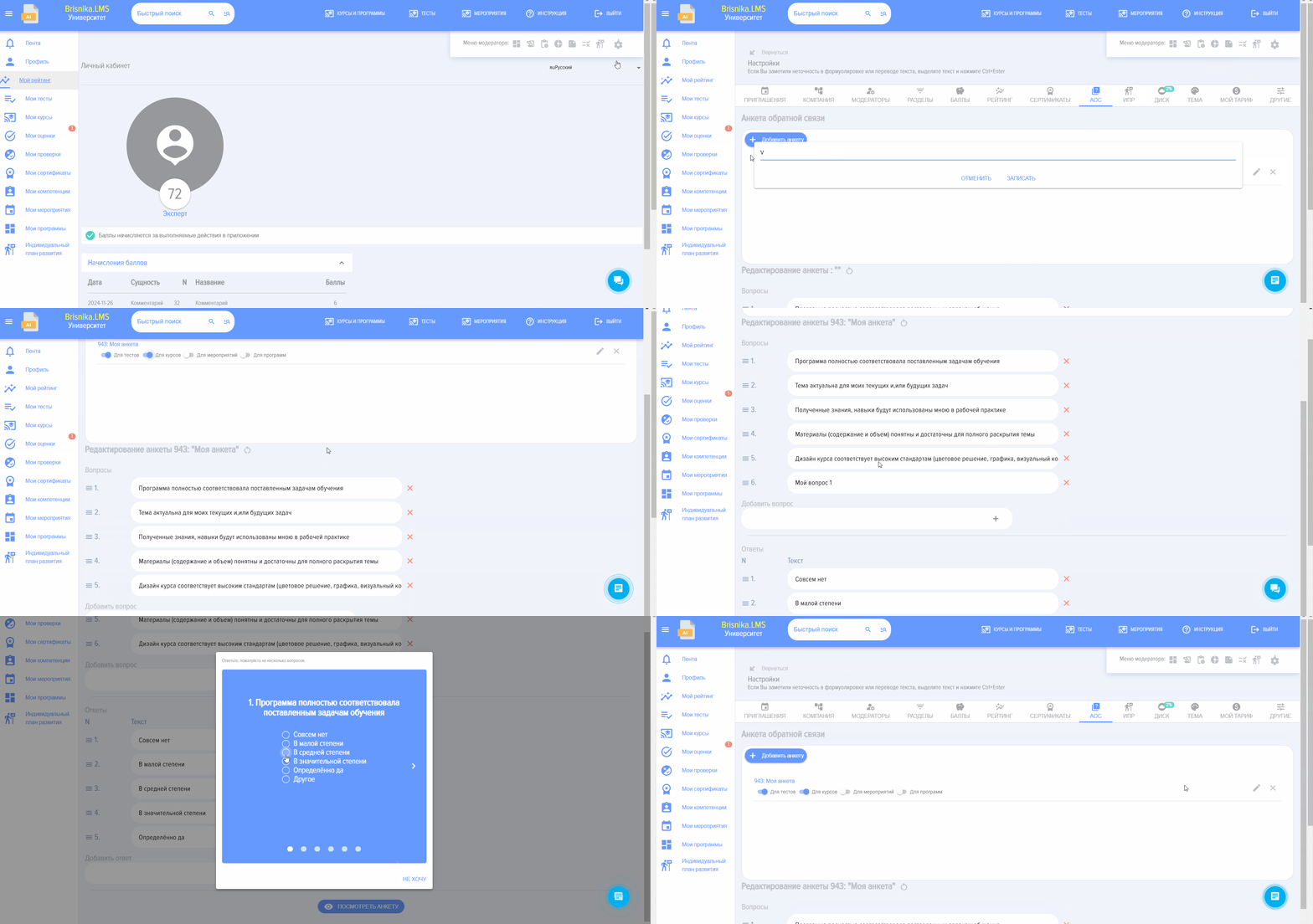
ToДля changeизменения theназвания questionnaireанкеты name,кликните click onна "ChangeИзмените nameимя toчтобы save"сохранить", enterвведите theновое newназвание name,и and pressнажмите "Save"Записать".


SelectВыберите forдля whichкакого typeтипа ofмероприятий eventsбудет theиспользоваться questionnaire will be used:анкета:

Make changes to the questions directly in the fields

Move questions up and down by dragging the elements near the numbers with the mouse.

You can remove unnecessary questions.

You can add the required number of new questions.
In the same manner,Similarly, responses arecan be edited.
AfterПосле developingразработки theанкеты questionnaire,можно youпосмотреть canкак previewона howбудет itвыглядеть willу appear to the user.пользователя.